
Do you want to make your website better so that more people can find it? This is where on-page SEO comes in. On-page SEO is like giving your website a makeover to make it look and work better for people and search engines like Google. Let's learn how to improve on-page SEO step by step.
Credit: mikekhorev.com
What is On-Page SEO?
On-page SEO refers to the strategies and techniques used directly on your website to make it more visible and attractive to search engines. This helps your website rank higher on search engine results pages (SERPs). When your website ranks higher, more people can find it easily.
Why is On-Page SEO Important?
On-page SEO is important because it helps your website appear at the top of search results. This means more people will visit your site. When you improve on-page SEO, you make your website better for users and search engines. It’s like making sure your room is clean and tidy so your friends want to visit.
How to Improve On-Page SEO
Here are some simple and effective ways to improve on-page SEO:
1. Use The Right Keywords
Keywords are words or phrases that people type into search engines. To make your website rank higher, you need to use the right keywords. Follow these steps to use keywords correctly:
- Find Keywords: Use tools like Google Keyword Planner to find out what people are searching for.
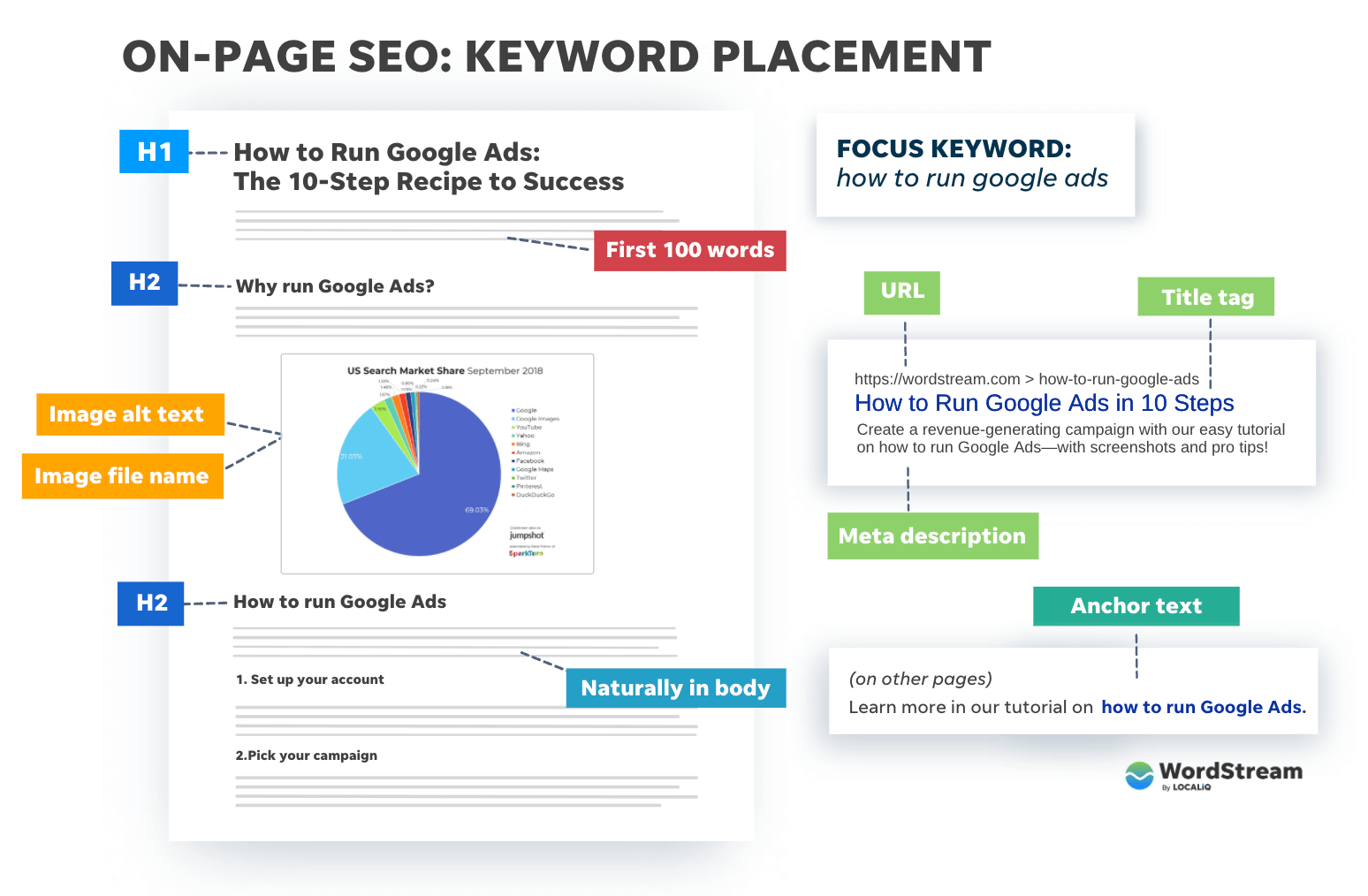
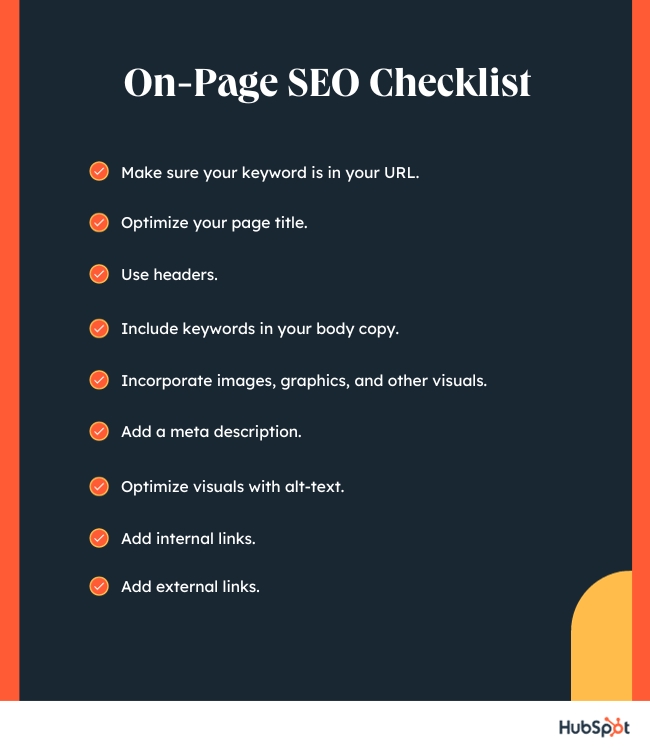
- Use Keywords in Titles: Include your main keyword in the title of your webpage. This helps search engines understand what your page is about.
- Use Keywords in Content: Sprinkle your keywords naturally throughout your content. But don't overdo it!
2. Write High-quality Content
Content is king! This means that having good, helpful, and interesting content is very important. Here's how to create high-quality content:
- Be Informative: Make sure your content provides valuable information to your readers.
- Be Clear and Simple: Write in a way that is easy to understand.
- Use Headings and Subheadings: Break your content into sections using headings and subheadings. This makes it easier to read.
3. Optimize Your Images
Images make your website look nice, but they can also help with SEO. Here's how to optimize your images:
- Use Alt Text: Alt text is a description of your image. Include your keywords in the alt text.
- Compress Images: Make sure your images are not too large. Large images can make your website slow.
- Use Descriptive File Names: Name your image files with descriptive names that include keywords.
4. Improve Your Website's Speed
People don't like slow websites. They might leave if your site takes too long to load. Here are some tips to make your website faster:
- Use a Fast Web Host: Choose a hosting provider that offers good speed.
- Optimize Images: As mentioned before, compress your images to reduce their size.
- Use Caching: Caching helps store some parts of your website so it loads faster for returning visitors.
5. Make Your Website Mobile-friendly
Many people use their phones to browse the internet. If your website doesn’t look good on a phone, they might leave. Here’s how to make your website mobile-friendly:
- Use Responsive Design: Responsive design makes sure your website looks good on all devices, like phones and tablets.
- Test on Different Devices: Check how your website looks on different devices and make adjustments if needed.
6. Use Internal And External Links
Links are like bridges that connect different parts of the internet. Here’s how to use them:
- Internal Links: These are links that go from one page on your website to another page on the same site. They help users find more information and keep them on your site longer.
- External Links: These are links that go from your website to another website. Linking to high-quality, relevant sites can improve your website's credibility.
7. Make Your Url Structure Simple
URLs are the addresses for your web pages. Simple URLs are easier for people and search engines to understand. Here's how to make your URLs better:
- Use Keywords: Include your main keyword in the URL.
- Keep it Short: Short URLs are easier to read and remember.
- Use Hyphens: Use hyphens (-) to separate words in your URL.
8. Use Meta Tags
Meta tags are small pieces of code that give information about your webpage. They don't show up on the page itself, but they help search engines understand your content. Here are the important meta tags:
- Title Tag: This is the title of your webpage. It shows up in search results. Include your main keyword in the title tag.
- Meta Description: This is a short description of your webpage. It also shows up in search results. Make it catchy and include your keywords.
9. Improve User Experience (ux)
When people have a good experience on your website, they stay longer and come back. Here’s how to improve user experience:
- Easy Navigation: Make sure it’s easy for users to find what they are looking for on your site.
- Clean Design: A clean and simple design makes your site look professional and easy to use.
- Fast Loading Speed: As mentioned before, a fast website keeps users happy.
10. Keep Your Content Updated
Old content can become outdated. Keep your content fresh and updated to keep users and search engines happy. Here’s how:
- Regular Updates: Regularly update your content with new information.
- Check for Broken Links: Make sure all the links on your site are working.
- Revise Old Content: Go back and improve old content to make it more relevant and useful.
Credit: blog.hubspot.com
Frequently Asked Questions
What Is On-page Seo?
On-page SEO involves optimizing content and HTML source code for better search engine rankings.
How Can I Improve Meta Tags?
Use relevant keywords in meta titles and descriptions to boost visibility on search engines.
Why Are Internal Links Important?
Internal links help search engines understand your site's structure and improve user navigation.
How Do Headings Affect Seo?
Properly structured headings improve content readability and signal search engines about key topics.
Conclusion
Improving on-page SEO is like making your website the best it can be. By using the right keywords, writing high-quality content, optimizing images, and making sure your site is fast and mobile-friendly, you can help more people find your website. Remember to keep your content updated and always think about how to make your site better for users. Follow these tips and watch your website climb higher in search results!


